



Driving licence photo size for Sarathi: photo and signature upload rules
The exact pixel and KB limits from Sarathi's own upload instructions, what the photo must look like, and when Aadhaar authentication or the RTO takes care of it.
Contents
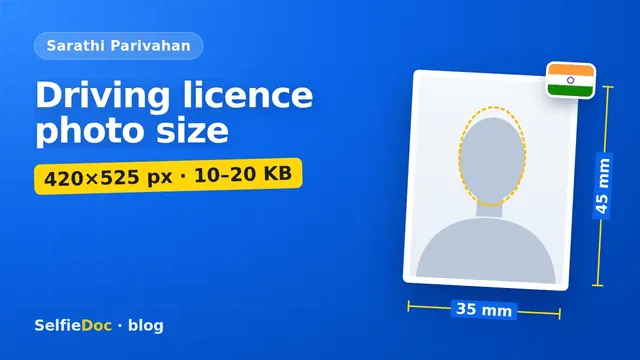
For a learner licence or driving licence application on Sarathi Parivahan, the photo is a recent colour JPG of 35×45 mm, preferably 420×525 pixels, between 10 KB and 20 KB, on a light, preferably white background. The signature is a separate JPG of 256×64 pixels, also 10–20 KB, signed in black pen on white paper. If you apply with Aadhaar authentication, some states take your details from Aadhaar and skip parts of the upload; without it, you may be photographed at the RTO. You can make the photo online from a good selfie in SelfieDoc: the service fits the size, background and head position to the Sarathi format.
Sarathi photo and signature requirements
| Parameter | Requirement | Source |
|---|---|---|
| Photo size | 35 mm wide × 45 mm high; 420×525 px preferred, at least 420 px wide and 525 px high | Sarathi PhotoSign instructions |
| Photo file | JPG, 10–20 KB, true colour | Sarathi PhotoSign instructions |
| Age of photo | taken within the last 6 months | Sarathi PhotoSign instructions |
| Background | light-coloured, preferably white | Sarathi PhotoSign instructions |
| Pose | look straight at the camera, relaxed face | Sarathi PhotoSign instructions |
| Glasses | allowed if there are no reflections and the eyes are clearly visible; no dark glasses | Sarathi PhotoSign instructions |
| Headwear | no caps or hats; religious headwear allowed if it doesn't cover the face | Sarathi PhotoSign instructions |
| Signature | 256×64 px preferred, JPG, 10–20 KB, black pen on white paper | Sarathi PhotoSign instructions |
| Scan / camera resolution | at least 300 ppi | Sarathi PhotoSign instructions |
Checked: October 2026 against "Photo and Signature Scan & Upload Process" on sarathi.parivahan.gov.in (archived copy of July 2026).
Learner licence and driving licence: the same photo rules
Sarathi publishes one instruction sheet for its "Upload Photograph and Signature" step, and it doesn't split the rules by learner licence (LL) or driving licence (DL). The upload comes while you fill in the online application, after you confirm your personal details. The instructions say the application won't be registered until the photo and signature are uploaded as specified, and that a file in the wrong size or format brings up an error message.
Sarathi serves every state, and a state's upload screen may show a slightly different limit. If it does, the screen wins.
The 420×525 pixels and 10–20 KB limits
The instruction sheet gives the dimensions in two ways: 35 mm wide and 45 mm high, with a minimum of 420 pixels by 525 pixels, and 420×525 named as the preferred size. That's the same 7:9 shape as an Indian passport photo.
Pay most attention to the KB range. The file must be at least 10 KB and no more than 20 KB. A phone photo is usually several megabytes, so you have to crop and resize it. A 420×525 JPG usually lands inside the range once you lower the quality slightly in any photo editor. Don't go too far the other way: a heavily compressed file under 10 KB is also rejected.
The sheet also suggests a camera or scan resolution of at least 300 ppi and true colour. For the finer points, it refers to page 13 of India's Face Image Data Standard.
Signature: 256×64 pixels
The signature has its own rules:
- Sign on white paper with a black pen.
- Only the applicant may sign.
- Scan or photograph it and crop to the signature, preferably 256×64 pixels.
- Save as JPG, 10–20 KB.
Applicants who can't sign give a thumb impression: the right thumb for women and the left thumb for men, as the instructions put it.
What the photo must look like
The rules are short and practical:
- Recent. Taken within the last six months.
- Colour, light background. White is preferred; a light plain wall is acceptable.
- Straight at the camera with a relaxed face.
- Glasses are fine if there's no glare and your eyes are clearly visible. Move the lamp or tilt your head slightly to get rid of reflections.
- No caps, hats or dark glasses. Religious headwear is allowed if your face is fully visible.
The instructions also warn that if the face or signature is unclear, the application may be rejected. Until the authorities finish scrutiny, you may be allowed to re-upload a clearer one by contacting the approving authority.
When you don't need to upload a photo
It depends on your state and on how you apply.
- With Aadhaar authentication. States that offer "faceless" services take your verified details from Aadhaar. Maharashtra's transport department, for example, says that with Aadhaar authentication you don't upload ID or address proof, and you don't need to visit the RTO for a learner licence. What the photo step looks like then varies by state, so follow the screen.
- Without Aadhaar authentication. You choose "Submit without Aadhaar Authentication", and after applying on Sarathi you visit the RTO, where the remaining steps are done.
- Existing licence with no photo on record. Maharashtra's FAQ says you must visit the RTO so they can capture your photo and signature before you can use faceless services.
If the Sarathi screen shows an "Upload Photograph and Signature" step, you need the files. If it doesn't, you don't.
Common mistakes with Sarathi uploads
- A file over 20 KB. Resize to 420×525 and compress a little.
- A file under 10 KB. Over-compressing to be safe gets you a blocky, unclear face and an error.
- A square crop. The 2×2 inch format used for some visas doesn't fit the 35×45 mm frame.
- An old photo. The limit is six months.
- A signature in blue ink or on lined paper. The rules ask for black pen on white paper.
- Signature uploaded in the photo field, or the other way round. Check the preview before you save.
How to make the photo
At a photo studio. Ask for a digital 420×525 pixel JPG, 10–20 KB, for Sarathi, plus a print if you need one for other forms.
At home. Stand in front of a light plain wall, face a window in daylight and ask someone to take the photo at eye level. Crop to head and shoulders at 7:9, resize to 420×525 and save as JPG within the limits.
Online from a selfie. SelfieDoc crops the photo to the Sarathi format, places the head and checks size and background before you download it. Your facial features stay as they are. Check the file size before uploading.
For other Indian forms with their own pixel and KB limits, see the passport size photo dimensions guide and the PAN card photo size article.
Sources
- Sarathi Parivahan: Photo and Signature Scan & Upload Process (PDF), checked via the Wayback Machine copy of July 2026.
- Sarathi Parivahan: state selection and online services.
- Transport Department, Maharashtra: FAQ on faceless learner licence service.
- Transport Department, Maharashtra: FAQ on Sarathi faceless services.
FAQ
What is the photo size for a driving licence on Sarathi?
Sarathi's upload instructions ask for a colour JPG, 35 mm wide and 45 mm high, preferably 420×525 pixels (minimum 420 by 525), with a file size between 10 KB and 20 KB.
What is the signature size for Sarathi?
256×64 pixels is the preferred size, JPG, 10–20 KB. Sign on white paper with a black pen; only the applicant may sign.
Is the learner licence photo size different from the driving licence photo size?
Sarathi publishes one set of photo and signature instructions for its upload step. If your state's screen shows a different limit, follow the screen.
Can I wear glasses in a driving licence photo?
Yes, ordinary glasses are fine if there are no reflections and your eyes are clearly visible. Dark glasses, caps and hats are not acceptable.
Can I make a driving licence photo online?
Yes. SelfieDoc crops a selfie to the Sarathi 35×45 mm format, places the head and checks size and background without changing your face. Check that the final file is between 10 and 20 KB before uploading.
Comments
Only registered users can comment
Sign in to commentSign in with the same account you use for SelfieDoc.
No comments yet. Be the first to ask a question, and we’ll answer.