



1x1 Picture: Size in cm and Where You Need It
The size of a 1x1 picture, which Philippine documents ask for one, and how to make and print it.
Contents
- 1x1 picture size in cm, inches and pixels
- Which documents need a 1x1 picture
- TIN ID 1x1 photo requirements
- 1x1 picture with white background
- Where to submit your 1x1 for a TIN ID
- 1x1 vs 2x2 and passport size
- How to make a 1x1 picture: at home, in a studio or online
- How to print 1x1 pictures on 4R paper
- Common mistakes
- Sources
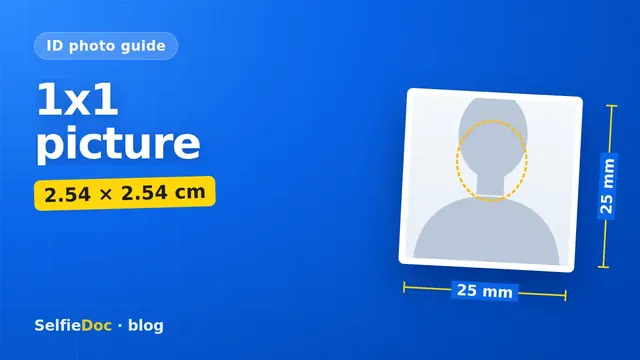
A 1x1 picture is a square ID photo, normally 1 × 1 inch: 2.54 × 2.54 cm (25.4 × 25.4 mm), or 300 × 300 pixels if you print it at 300 dpi. Memos of the Bureau of Internal Revenue (BIR) say only "1x1" and don't name the unit. In the Philippines, it is the standard photo for the BIR TIN card, which needs one printed copy, and for the Digital TIN ID, which needs a 1x1 photo on a white background without a border, uploaded in ORUS. You can make a 1x1 picture online from a good selfie in SelfieDoc.
1x1 picture size in cm, inches and pixels
In ID-photo use, 1x1 means one inch on each side. These are the same size in different units (pixels apply only at 300 dpi):
| Unit | 1x1 picture |
|---|---|
| Inches | 1 × 1 in |
| Centimeters | 2.54 × 2.54 cm |
| Millimeters | 25.4 × 25.4 mm |
| Pixels at 300 dpi | 300 × 300 px |
Two points before you print:
- The BIR memos say "1x1 ID picture" without naming the unit. Reading it as one inch matches how 1x1 ID photos are made, and it is how the SelfieDoc TIN ID template is set. If your Revenue District Office (RDO) asks for something different, follow the RDO.
- 300 × 300 px is a print calculation, not a BIR rule: one inch at 300 dots per inch gives 300 pixels. It produces a sharp 1x1 print. The BIR's limit for the Digital TIN ID upload is set in file format and file size, not pixels.
A 1x1 picture is not 1 × 1 cm. A one-centimeter square is less than half as wide as a real 1x1 ID photo.
Which documents need a 1x1 picture
BIR asks for a 1x1 picture for the TIN ID. For any other Philippine ID or form, check the issuing agency's own checklist.
| Document | 1x1 needed? | What you submit | Source |
|---|---|---|---|
| TIN card (physical, BIR) | Yes | 1 printed 1x1 ID picture, the latest one, 1 original copy | RMC No. 58-2023; BIR Citizen's Charter |
| Digital TIN ID (BIR) | Yes | 1x1 photo with white background, no border, uploaded in ORUS | RMC No. 120-2023 |
| Other Philippine IDs and forms | Check with the agency | Follow the agency's current checklist | — |
TIN ID 1x1 photo requirements
The physical card and the Digital TIN ID come under different memos, so their photo rules are listed separately.
| Parameter | Requirement | Source |
|---|---|---|
| Size | 1x1 ID picture | RMC No. 58-2023 |
| Copies (physical card) | 1 original copy of your latest 1x1 photo | BIR Citizen's Charter, TIN card service |
| How it is attached (physical card) | Pasted on the TIN card in the presence of BIR personnel; personal appearance, no representative | RMC No. 58-2023 |
| Background (Digital TIN ID) | White, without border | RMC No. 120-2023 |
| How recent (Digital TIN ID) | Taken within the last 6 months, showing how you look now | RMC No. 120-2023 |
| Head position (Digital TIN ID) | Facing the camera directly, both ears visible | RMC No. 120-2023 |
| Expression and eyes (Digital TIN ID) | Neutral, or a smile without showing teeth; eyes open and clearly visible | RMC No. 120-2023 |
| File (Digital TIN ID) | JPEG/JPG or PNG, maximum 10 MB | RMC No. 120-2023 |
| Upload (Digital TIN ID) | In ORUS: "View your Digital TIN ID", then "ADD PHOTO" | ORUS (BIR) |
| Non-compliant photos (Digital TIN ID) | Not valid for transactions; uploading someone else's photo, a cartoon, or similar is penalized | RMC No. 120-2023 |
Based on BIR RMC No. 58-2023, RMC No. 120-2023 and the BIR Citizen's Charter. Confirm the current wording with your RDO before you print.
The memos we found don't set rules on glasses, head coverings, clothing, head size in the frame, or photos of minors. If any of these apply to you, ask your RDO before you print.
1x1 picture with white background
Use a white background for your TIN ID photo. The Digital TIN ID memo asks for a white background and no border. The physical card memo doesn't name a color, so a white-background print works for both.
What a clean white background looks like:
- Plain white wall or sheet behind you, with no patterns, furniture, or doorframes in the shot.
- No shadow of your head on the wall. Stand a step or two away from it.
- No white border or frame added around the photo. The Digital TIN ID rule says "without border."
- Even light on your face, so it doesn't blend into the white.
Where to submit your 1x1 for a TIN ID
You can use your own photo for both versions. Only the way you hand it over is different.
Physical TIN card. Bring one printed 1x1 picture to your RDO. You must appear in person, because the photo is pasted on the card in front of BIR personnel. If you later lose the card, the replacement fee is PHP 100 plus an affidavit of loss (RMC No. 58-2023).
Digital TIN ID. You upload a file through ORUS:
- Log in to your account at orus.bir.gov.ph (create one first if you don't have it).
- Open "View your Digital TIN ID".
- Click "ADD PHOTO".
- Choose your 1x1 photo as JPEG/JPG or PNG, no larger than 10 MB.
- Before you upload, check that your full face is visible on a white background, with no border.
1x1 vs 2x2 and passport size
A 1x1 and a 2x2 are both square, but a 2x2 is twice as wide and twice as tall. Passport-size photos are a different format, so name the size clearly when you order. A 2x2 trimmed down is not a proper 1x1, because the face ends up too small or cut off.
How to make a 1x1 picture: at home, in a studio or online
In a studio. Ask for a "1x1 ID picture, white background." Ask for the digital file too, so you can upload it to ORUS.
At home with a photo editor. Any 1x1 photo editor or phone app with a crop tool can do this:
- Take the photo against a plain white wall in daylight, camera at eye level. Our guide to taking a passport photograph with your phone covers light and framing.
- Crop to a perfect square, centered on your face (for the Digital TIN ID, both ears must be visible).
- Export at 300 × 300 px if you plan to print at 1 inch and 300 dpi.
- Save as JPEG or PNG. For ORUS, keep the file under 10 MB.
- Don't add borders, filters, or text.
Online from a selfie. SelfieDoc crops your selfie to the 1x1 TIN ID template on a white background. Your facial features are not changed. You get a file for ORUS and a layout ready for printing.
How to print 1x1 pictures on 4R paper
Print several 1x1 copies on one standard 4R sheet (4 × 6 inch, about 10 × 15 cm). It gives you spare copies.
- Print at 100% or "actual size." "Fit to page" will enlarge the photos and they will no longer be 1 inch.
- After printing, measure one photo with a ruler. It should be 2.54 cm on each side.
- Photo paper usually gives a sharper print than plain paper.
- Leave a little space between copies so you can cut them cleanly.
Common mistakes
- Wrong unit. Printing a 1 cm square instead of a 1 inch square.
- Old photo. For the Digital TIN ID, the photo must be taken within 6 months.
- Border or colored background. The Digital TIN ID needs white, without a border.
- Head turned or hair over the ears. Face the camera directly with both ears visible.
- Big smile. A smile is fine only if your teeth don't show.
- Wrong file. HEIC, WEBP, or a PDF instead of JPEG/PNG, or a file larger than 10 MB.
- Someone else's photo or a cartoon. RMC No. 120-2023 says this is penalized.
Sources
FAQ
What is the 1x1 picture size in cm?
A 1x1 ID picture is read as 1 × 1 inch, which is 2.54 × 2.54 cm (25.4 × 25.4 mm). BIR documents say only "1x1" and don't state the unit. If you are unsure, check with your RDO.
Is a 1x1 picture 1 cm by 1 cm?
No. For ID photos, 1x1 means one inch on each side, which is about 2.54 cm. The BIR text doesn't name the unit, so ask your RDO if you need to be certain.
Can I take a 1x1 ID picture online?
You can prepare one online. For the TIN card, you bring your own printed 1x1 photo, and for the Digital TIN ID, you upload your own file in ORUS. You can take a clear selfie and turn it into a 1x1 picture on a white background with a service like SelfieDoc, then print it or upload it. The BIR still decides whether to accept it.
What background should a 1x1 picture for a TIN ID have?
For the Digital TIN ID, the photo must have a white background and no border (RMC No. 120-2023). We couldn't confirm a background color for the physical card, so a white-background print is the practical choice for both.
How many 1x1 pictures do I need for a TIN card?
One. The BIR service page asks for the latest 1x1 photo ID, 1 original copy. It is pasted on the card in front of BIR personnel.
What file format and size does the Digital TIN ID photo need?
JPEG/JPG or PNG, up to 10 MB, according to RMC No. 120-2023. The photo should be taken within the last 6 months.
Comments
Only registered users can comment
Sign in to commentSign in with the same account you use for SelfieDoc.
No comments yet. Be the first to ask a question, and we’ll answer.