

Australian passport photo requirements 2026
The size, background, print and back-of-photo rules for an Australian passport photo, and the common mistakes to avoid.
Contents
- Australian passport photo requirements at a glance
- Australian passport photo size in mm and pixels
- Where you lodge the photos and whether your own photo works
- The guarantor and the back of the photo
- Printing: dye sublimation and 200 gsm paper
- Common Australian passport photo mistakes
- Glasses, headwear and children
- Taking the photo at home, in a studio or online
- Sources
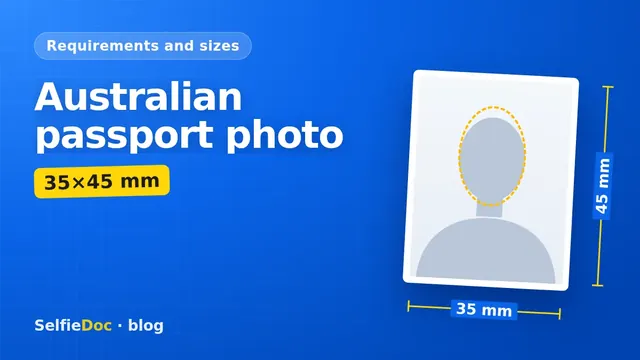
An Australian passport photo is a printed colour photo 35–40 mm wide and 45–50 mm high, with 35×45 mm as the standard print. Your face must measure 32–36 mm from chin to crown, on a plain white or light grey background. The rules describe 2 photos less than 6 months old; printed photos must be made by dye sublimation, not inkjet, on glossy paper of at least 200 gsm. You can prepare a photo to this template from a good selfie online in SelfieDoc.
Australian passport photo requirements at a glance
The Australian Passport Office sets the rules on passports.gov.au. A separate PDF covers camera operators. Here they are in one place.
| Parameter | Requirement | Source |
|---|---|---|
| Photo size | 35–40 mm wide, 45–50 mm high; standard print 35×45 mm | passports.gov.au, Passport photos; Camera operator guidelines |
| Face height (chin to crown) | 32–36 mm | passports.gov.au, Passport photos |
| Background | Plain white or light grey, contrasting with your face | passports.gov.au, Passport photos |
| Pose and lighting | Face centred, looking straight at the camera, uniform lighting | passports.gov.au, Passport photos |
| Age of photo | Less than 6 months old | passports.gov.au, Passport photos |
| Number of photos | 2 good-quality photos | passports.gov.au, Passport photos |
| Back of the photo | Your full name on the back of one photo, in black pen | passports.gov.au, Passport photos |
| Printing | Colour, dye sublimation, not an inkjet printer | passports.gov.au, Passport photos |
| Paper | Heavy-weight glossy paper, at least 200 gsm | passports.gov.au, Passport photos |
| Camera | Focal length 90–130 mm (35 mm equivalent), at least 1.2 metres from the subject | Camera operator guidelines |
| Editing | Only brightness and contrast; retouching is not permitted | Camera operator guidelines |
Source: passports.gov.au (Passport photos, Camera operator guidelines). Requirements can change, so confirm them on the official pages before you print.
Australian passport photo size in mm and pixels
The official size is a range: 35–40 mm wide and 45–50 mm high. 35×45 mm is the standard print size. Inside that frame, the measurement that matters most is the face. It must be 32–36 mm from the bottom of the chin to the top of the head.
The Passport Office guidance describes a printed photo and gives no pixel size or file size. If you need a digital file to print a 35×45 mm photo at 300 dpi, the maths gives about 413×531 px (mm ÷ 25.4 × 300). That is a print setting. It is not an official Australian requirement.
Where you lodge the photos and whether your own photo works
The photo rules describe 2 printed photos. Check on passports.gov.au whether your route takes prints or a digital upload, where to lodge for your application type, in Australia or overseas, and which route applies to a renewal.
The Passport Office publishes standards for the photo itself. A separate set of guidelines is written for camera operators. Check on passports.gov.au whether you may take the photo yourself or must use a photographer for your application type. Whoever takes it, the photo must meet the same size, face height, background and lighting rules.
Whether a digital photo is accepted for any online route is not stated in the rules for printed photos. Confirm this on passports.gov.au for your application type.
The guarantor and the back of the photo
Your application form may ask a guarantor to endorse one of your 2 photos. The guarantor certifies that the photo is a true photo of the applicant. Who can act as guarantor, and what they write for adults, is set out on the form and passports.gov.au.
The checklist published by the Australian mission in Geneva gives an example for child applications. There the guarantor completes section 11 of the form and writes "This is a true photo of [full name]" on the back. The same checklist gives a minimum age of 18 for the guarantor; check the current criteria for your own application.
Whether you need a guarantor at all depends on your application type; for adults and renewals, check the current form. Check the form and passports.gov.au before you ask someone to sign. Separately, you write your own full name on the back of one photo in black pen.
Printing: dye sublimation and 200 gsm paper
The print rule catches out a lot of home printers. The Passport Office asks for colour photos printed by dye sublimation, not on an inkjet printer. They must be on heavy-weight glossy paper of at least 200 gsm.
In practice:
- Get a file or print layout that holds your photo at 35×45 mm.
- Take it to a photo lab or kiosk and ask whether it prints by dye sublimation.
- Choose glossy paper and confirm that it is at least 200 gsm.
- Check the printed size with a ruler: the photo should be 35×45 mm and the face 32–36 mm.
- Keep both photos clean and undamaged, and don't trim into the face.
Common Australian passport photo mistakes
Most problems come from breaking one of the rules in the table above. These are the ones to check before you lodge:
- The photo is too old. It must be less than 6 months old, even if you still look the same.
- The face is the wrong size. The photo is 35×45 mm, but the head is cropped too small or too large. Measure chin to crown: 32–36 mm.
- The background is wrong. It is cream, patterned or shadowed, or it has no contrast with pale hair or a white top.
- The lighting is uneven. One side of the face is darker, or a shadow falls behind the head.
- You are not looking straight at the camera. The head is tilted or turned, or the face is off-centre.
- It was printed on inkjet. Home prints on photo paper often fail the dye-sublimation rule.
- The photo has been retouched. Smoothing skin or removing marks goes beyond the brightness and contrast changes that are allowed.
- The back is missing a detail. There is no name in black pen, or an endorsement that your form asks for is missing.
- The 2 photos don't match. Bring 2 prints of the same shot.
Glasses, headwear and children
The rules for these cases are best read in full on passports.gov.au before the shoot. This covers glasses, religious or medical headwear, expression and photos of babies and young children. If you wear glasses or a head covering, check the current wording on that page first. It is easier to plan the photo around the rule than to reshoot.
For a child, check the child application rules on passports.gov.au before the shoot. The requirements for babies and young children may differ from those for adults.
Taking the photo at home, in a studio or online
Whichever option you choose, check the result against the table before you lodge.
At a studio or pharmacy photo counter. Many places that offer passport photos print on the spot. Ask whether they use dye sublimation and 200 gsm glossy paper, and check the face size on the print before you leave.
At home with a phone. Stand in front of a plain white or light grey wall and face a window for even light. The camera operator guidelines call for a 90–130 mm focal length (35 mm equivalent) and a distance of at least 1.2 metres. Phone main lenses are usually much wider than that, so a phone shot may not match the camera operator guidelines. A studio or lab is the safer choice for the print. Our guide on taking a passport photograph with your phone covers the setup step by step. If your route needs printed photos, you still need a dye-sublimation print afterwards.
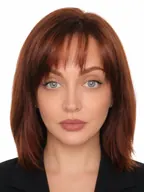
Online from a selfie. SelfieDoc crops the photo, replaces the background with a plain one and fits the head position to the 35×45 mm Australian template. It does not change your facial features. You get a photo file and a print layout. If your route needs printed photos, take the layout to a lab that prints by dye sublimation on glossy paper of at least 200 gsm.
Sources
FAQ
What size is an Australian passport photo?
The photo must be 35–40 mm wide and 45–50 mm high. The standard print is 35×45 mm. Your face, measured from chin to crown, must be 32–36 mm tall.
How many photos do I need for an Australian passport?
The photo rules describe 2 good-quality photos that are less than 6 months old, with your full name written on the back of one photo in black pen. Your application form may also ask a guarantor to endorse one photo. Check on passports.gov.au what your application route needs.
Can I take an Australian passport photo online?
You can prepare the photo online from a good selfie. SelfieDoc fits it to the 35×45 mm template and gives you a file and a print layout. If your route needs printed photos, they must be dye-sublimation prints on glossy paper of at least 200 gsm, so ask your photo lab how it prints. Check on passports.gov.au whether your application route takes prints or a digital photo.
Can I print my Australian passport photo at home?
Usually not on a home printer. The Australian Passport Office asks for dye-sublimation prints, not inkjet, on heavy-weight glossy paper of at least 200 gsm. Most home printers are inkjet.
What background is allowed for an Australian passport photo?
The background must be plain white or light grey. It also has to contrast with your face, so pale hair or clothing against white can be a problem.
Can the photo be edited?
Only brightness and contrast may be adjusted. Retouching is not permitted under the camera operator guidelines published by the Australian Passport Office.
Comments
Only registered users can comment
Sign in to commentSign in with the same account you use for SelfieDoc.
No comments yet. Be the first to ask a question, and we’ll answer.