

UK passport photo requirements 2026
Size, background, head height and file rules for a British passport photo, for printed and digital applications, checked against GOV.UK.
Contents
- UK passport photo requirements at a glance
- UK passport photo size: print and digital
- Background: cream or light grey, not white
- Where you apply and whether your own photo is accepted
- Why UK passport photos get rejected: what the rules exclude
- Exceptions: glasses, head coverings and children
- How to take the photo: booth, shop, at home or online
- Sources
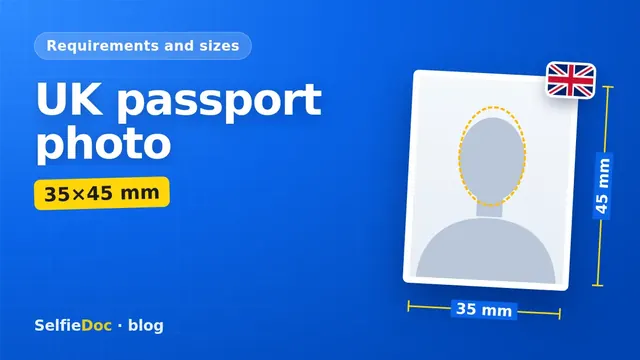
A printed UK passport photo must be 45 mm high and 35 mm wide. It must be in colour, on a plain cream or light grey background, with your head 29–34 mm tall from crown to chin. A paper form needs 2 identical prints. For an online application on GOV.UK you need a digital photo of at least 600×750 pixels and 50 KB–10 MB, on a plain light-coloured background, taken in the last month. You can make the 35×45 mm print for a paper form from a good selfie online in SelfieDoc.
UK passport photo requirements at a glance
HM Passport Office publishes one set of rules on GOV.UK. Printed and digital photos are treated differently in places, especially the background and the size.
| Parameter | Requirement | Source |
|---|---|---|
| Printed photo size | 45 mm high × 35 mm wide | GOV.UK: Photo requirements |
| Head height (printed) | Crown of head to chin between 29 mm and 34 mm | GOV.UK: Photo requirements |
| Framing | Close-up of full head and upper shoulders, facing forwards, looking straight at the camera | GOV.UK: Photo requirements |
| Background (printed) | Plain cream or light grey | GOV.UK: Photo requirements |
| Background (digital) | Plain light-coloured | GOV.UK: Photos for passports |
| Paper | In colour, on plain white photographic paper, no border | GOV.UK: Photo requirements |
| Digital photo size | At least 600 px wide and 750 px tall. No maximum given | GOV.UK: Photos for passports |
| File size (digital) | At least 50 KB, no more than 10 MB | GOV.UK: Photos for passports |
| Photo code file | JPEG, 50 KB–10 MB; ideal size 3 MB | GOV.UK: Photo codes |
| Cropping (digital) | Do not crop it yourself. The service crops it for you | GOV.UK: Photos for passports |
| Expression | Plain expression, mouth closed, eyes open and visible | GOV.UK: Photo requirements |
| Hair, shadows, red eye | No hair in front of the eyes, no red eye, no shadows on the face or behind you | GOV.UK: Photo requirements |
| Quality | Clear, in focus, unaltered by computer software | GOV.UK: Photo requirements |
| How recent | Taken in the last month | GOV.UK: Photos for passports |
| Number of prints | 2 identical printed photos for a paper form | GOV.UK: Photo requirements |
| Back of print | Unmarked on both sides, unless the photo needs to be countersigned | GOV.UK: Photo requirements |
Checked against GOV.UK (Photos for passports, Photo requirements, Photo codes); source text retrieved 2026-10-25.
UK passport photo size: print and digital
The printed photo is 45 mm high by 35 mm wide. Inside that frame, your head takes up 29–34 mm from the crown to the chin. The head must fall within this range even if the paper is cut correctly.
For digital photos GOV.UK sets only a minimum: 600 pixels wide and 750 pixels tall. It does not state a dpi or a fixed pixel size for prints. If you see a "standard" pixel size elsewhere that is smaller than 600×750, it will not meet the digital minimum.
Background: cream or light grey, not white
The printed photo needs a plain cream or light grey background. Many people assume it should be white. In the GOV.UK wording, white describes the photographic paper, not the background.
For digital photos the rule is broader: a plain light-coloured background. Either way, avoid patterns, doors, shelves and anything that throws a shadow behind you.
Where you apply and whether your own photo is accepted
You apply on GOV.UK, either online or with a paper form. The photo rules depend on which route you take.
Online application
The online application needs a digital photo. GOV.UK describes two ways to provide it:
- Get your photo taken in a photo booth or shop and choose the option to get a code. You enter that code in your application.
- Take the photo on your own device during the application. You will need someone to help you.
Your own photo is allowed. GOV.UK also says that booth or shop photos are more likely to be approved than photos taken on your own device. On the online route, do not crop the photo yourself. The service crops it for you, so a pre-cut 35×45 mm template is not what it asks for here.
Paper application
A paper form needs 2 identical printed photos at 35×45 mm (35 mm wide, 45 mm high). Leave both sides unmarked, unless the photo has to be countersigned. This is where a ready-made 35×45 mm file and print layout is most useful.
Applying from outside the UK or renewing
The photo rules above are the ones HM Passport Office publishes on GOV.UK. If you are applying from outside the UK, check GOV.UK for how to apply. When renewing, you still need a new photo, because it must have been taken in the last month.
Why UK passport photos get rejected: what the rules exclude
The rules themselves show what to avoid:
- Wrong head size. The head must be 29–34 mm on the print.
- Wrong background. On a print, a pure white, patterned or uneven background does not match "plain cream or light grey".
- Shadows. No shadows on your face or behind you.
- Hair over the eyes. Your eyes must be clearly visible.
- Expression. A smile or open mouth breaks the plain-expression rule.
- Red eye or blur. The photo must be clear and in focus.
- Edited photos. The photo must be unaltered by computer software. Do not retouch the photo: no skin smoothing, reshaping or filters.
- Old photo. Anything taken more than a month ago does not qualify.
- Marked prints. Writing on the back is only allowed when the photo needs to be countersigned.
- Self-cropped digital photo. On the online route, leave the cropping to the service.
Exceptions: glasses, head coverings and children
Glasses
Do not wear glasses unless you have to. If you do, they must not be sunglasses or tinted. Your eyes must not be covered by the frame, glare, reflections or shadows.
Head coverings
Head coverings are not allowed, unless they are worn for religious or medical reasons.
Children and babies
A child must be alone in the photo. Babies must not hold toys or use dummies. Children under 6 do not have to look straight at the camera or keep a plain expression. Children under one do not need to have their eyes open. For a child's photo, use a booth, a shop or the GOV.UK option on your own device.
How to take the photo: booth, shop, at home or online
Photo booth or shop. This is the route GOV.UK says is more likely to be approved. Ask for a digital code if you are applying online, or for prints if you are using a paper form.
At home on your own device. You can do this during the online application, with someone holding the camera. Stand in front of a plain light wall, face a window for even light, and keep your hair away from your eyes. For more tips on framing and light, see how to take a passport photograph with your phone.
Online from a selfie. For a paper application, SelfieDoc turns a good selfie into a 35×45 mm photo and gives you a print layout. You print it on photographic paper at home or at a print shop and cut out 2 identical copies. The selfie should already be sharp, well lit and taken from the front with a neutral expression. The service adjusts the framing, background and size. It cannot fix a blurred or shadowed face.
Before you submit, check:
- Taken in the last month
- Head 29–34 mm on the print, full head and upper shoulders in frame
- Plain cream or light grey background (print) or plain light-coloured background (digital)
- Mouth closed, eyes open, no hair over the eyes, no shadows
- 2 identical, unmarked prints for a paper form
- Digital file at least 600×750 px and 50 KB–10 MB, not cropped by you
Sources
FAQ
What size is a UK passport photo?
A printed photo must be 45 mm high and 35 mm wide. Your head, from crown to chin, must be 29–34 mm high. A digital photo must be at least 600 pixels wide and 750 pixels tall, with a file size of 50 KB to 10 MB.
Does a UK passport photo need a white background?
Not on a printed photo. GOV.UK asks for a plain cream or light grey background on printed photos and a plain light-coloured background on digital photos. The word white in the rules refers to the photographic paper.
How many photos do I need for a UK passport?
For a paper application you need 2 identical printed photos. For an online application you provide one digital photo, either with a code from a photo booth or shop, or by taking it on your own device during the application.
Can I take a UK passport photo online?
Yes, in two ways. GOV.UK lets you take the photo on your own device during the online application, with someone helping you. Separately, you can make a 35×45 mm print for a paper form from a good selfie in SelfieDoc. GOV.UK notes that booth or shop photos are more likely to be approved than photos taken on your own device. For the online route, GOV.UK also says not to crop the photo yourself.
Can I smile in a UK passport photo?
No. You need a plain expression with your mouth closed and your eyes open and visible. Children under 6 do not have to have a plain expression.
Do I need a new photo to renew my UK passport?
Yes. GOV.UK says your photo must have been taken in the last month, so an old photo or one from your current passport will not meet the rules.
Comments
Only registered users can comment
Sign in to commentSign in with the same account you use for SelfieDoc.
No comments yet. Be the first to ask a question, and we’ll answer.