
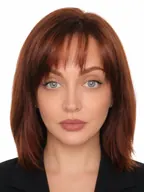


US Passport Photo Requirements 2026
The size, head height, background and file rules for a US passport photo. Also covers the most common reasons a photo gets sent back and how to get it right at home, at a store or online.
Contents
- US passport photo requirements at a glance
- Where you submit the photo and whether your own photo works
- Common reasons a passport photo is not accepted
- Exceptions: glasses, head coverings, children
- How to take a good passport photo: at home, at a store or online
- Digital vs printed, passport vs visa
- Sources
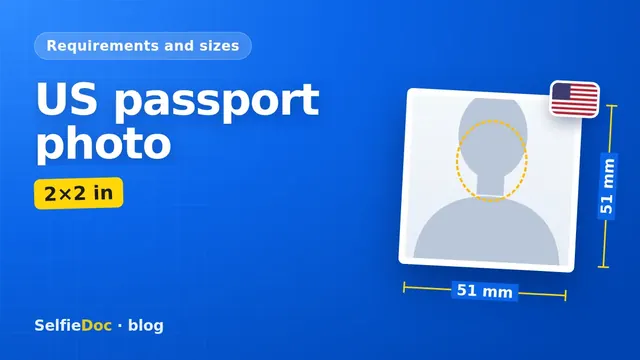
A US passport photo is a 2 × 2 inch (51 × 51 mm) color photo taken in the last 6 months. Your head should measure 1 to 1 3/8 inches from chin to top. The background must be plain white or off-white. A paper application needs 1 printed photo, and online renewal takes a digital file of 54 KB to 10 MB. You can make this photo online from a good-quality selfie in SelfieDoc.
US passport photo requirements at a glance
These are the rules from the State Department's passport photo pages. They apply to a US passport application or renewal.
| Parameter | Requirement | Source |
|---|---|---|
| Print size | 2 × 2 in (51 × 51 mm) | Passport Photos, travel.state.gov |
| Head height | Chin to top of head: 1 to 1 3/8 in (25–35 mm) | Passport Photos, travel.state.gov |
| Color | Color photo | Passport Photos, travel.state.gov |
| How recent | Taken in the last 6 months | Passport Photos, travel.state.gov |
| How many | 1 photo | Passport Photos, travel.state.gov |
| Background | Plain white or off-white, with no shadows, texture or objects | Passport Photos, travel.state.gov |
| Glasses | Remove all glasses, including sunglasses and tinted lenses. If you can't for medical reasons, you need a signed doctor's note | Passport Photos, travel.state.gov |
| Filters and retouching | Not allowed. Any editing in software, including the outline of the head, face or neck, makes the photo unacceptable | Passport Photos, travel.state.gov |
| Digital file (online renewal) | JPG, JPEG, PNG, HEIC or HEIF, 54 KB – 10 MB | Uploading a Digital Photo, travel.state.gov |
| Pixels | No fixed pixel size found for passport uploads. A 2 in print at 300 dpi works out to 600 × 600 px | Calculation: 2 in × 300 dpi; SelfieDoc requirements base |
Based on summaries of the travel.state.gov pages (Passport Photos; Uploading a Digital Photo), October 2026. Confirm the exact wording on the official pages before you submit.
Size and head height
A 2 × 2 inch photo is square. The head takes up roughly 50 to 70 percent of its height. Measure from the bottom of your chin to the top of your head, including hair. A head under 1 inch or over 1 3/8 inches is one of the easiest ways to fail the size check. A close crop is not enough on its own.
Background
The wall behind you must be plain white or off-white. It should have no visible texture, pattern, shadow or objects. A bright white wall works better than a cream one. Light falling from one side often throws your shadow onto the wall, so even lighting matters as much as the paint color.
Rules we couldn't confirm in full
Our sources leave out the rules on expression, head coverings and photos of children. We couldn't retrieve that text word for word, so we don't quote numbers or exact wording here. Read the Passport Photos page for these points before your photo is taken.
Where you submit the photo and whether your own photo works
The route decides whether the photo goes in printed or as a file.
- Paper application. You attach 1 printed color photo, 2 × 2 in, to your application.
- Online renewal. You upload a digital photo. The file must be JPG, JPEG, PNG, HEIC or HEIF and be between 54 KB and 10 MB.
If you'd rather have the photo taken in person, ask the place where you submit your application whether they offer it. Services and prices vary, and we couldn't confirm official fees, so check them locally.
Common reasons a passport photo is not accepted
Most rejections come from a few rules on the official page. Run through this list before you print or upload.
- Wrong head size. The head is smaller than 1 in or larger than 1 3/8 in from chin to top.
- Wrong print size. The print is not exactly 2 × 2 in. Home printers sometimes scale the image, so measure the print with a ruler.
- Glasses on. Regular glasses, sunglasses and tinted lenses all count. Only a medical exception with a signed doctor's note applies.
- Background problems. Shadows, a patterned wall, a door frame or a lamp in the shot.
- Filters or retouching. Beauty filters, skin smoothing and edits to the outline of the head, face or neck make the photo unacceptable.
- Old photo. The photo was taken more than 6 months ago.
- Black-and-white photo. The rule asks for color.
- Wrong file for online renewal. The file is under 54 KB, over 10 MB, or in a format outside the list.
Exceptions: glasses, head coverings, children
Glasses
Take them off. The only exception is medical. If you can't remove your glasses for a medical reason, include a signed note from your doctor.
Head coverings and hats
We couldn't confirm the official rules for head coverings, including religious and medical cases, so we don't state them here. Check the conditions on travel.state.gov before your photo is taken.
Piercings, tattoos and braces
We didn't find separate rules for piercings, tattoos or braces on the pages we checked. One rule does apply: no retouching. Don't edit them out of the photo, because any editing of the face makes it unacceptable.
Children and babies
We couldn't confirm the rules for children and babies, so we don't state them here. For a child's passport, follow the official guidance on the Passport Photos page.
How to take a good passport photo: at home, at a store or online
You have three practical options. Each one ends up at the same 2 × 2 in standard.
At home with a phone
- Stand about an arm's length or more from a plain white or off-white wall.
- Use soft, even light from the front, such as a window facing you. Avoid an overhead lamp that casts shadows under the eyes.
- Take off your glasses.
- Ask someone to hold the phone at eye level, or use a stand and a timer. Keep your face straight to the camera.
- Don't use filters, portrait mode blur or beauty modes.
For phone setup and framing tips, see our guide on how to take a passport photograph with your phone.
At a store or photo studio
Pharmacies, shipping stores and photo studios often offer passport photos; check the service and price with the store. This saves you from printing the photo yourself. Before you leave, ask to see the print and check the head size and background against the table above.
Online from a selfie
You can take the photo at home and let a service do the cropping. SelfieDoc crops your photo to 2 × 2 in, sets the head size, evens out the background to white and adjusts the size. Your facial features stay unchanged. The State Department does not allow edits to the outline of the head, face or neck, so check the result against the official rules. You get a digital file for online renewal and a print layout you can take to a photo lab.
Printing at home or at a photo lab
Print at actual size, with no "fit to page" scaling. Then check with a ruler that the photo is exactly 2 × 2 in. A print file at 300 dpi measures 600 × 600 px for a single photo. We couldn't confirm official paper requirements, such as matte or glossy, so check the Passport Photos page or ask the lab.
Digital vs printed, passport vs visa
A paper application and online renewal have different format rules. A paper application needs a 2 × 2 in print. Online renewal needs a digital file of 54 KB to 10 MB in an accepted format. We didn't find a fixed pixel size for passport uploads.
Visa photos follow their own State Department page. The 600 × 600 px and 240 KB figures you often see online come from the Diversity Visa program, not from passport rules. If you're applying for a US visa instead, see our guide to US visa photo requirements for the DS-160.
Sources
FAQ
What size is an American passport size photo?
The printed photo is 2 × 2 inches (51 × 51 mm). From the bottom of your chin to the top of your head should measure 1 to 1 3/8 inches (25–35 mm). This is the rule on the Passport Photos page at travel.state.gov.
Can I take a US passport photo online?
Yes, you can prepare it online. Take a clear photo of yourself against a plain wall in even light, without glasses. A service like SelfieDoc then crops it to 2 × 2 in, sets the head size and evens out the background to white without changing your facial features. You can upload the file for online renewal or print it for a paper application. The final check is done by the State Department, so compare your photo against the official rules before you submit.
Can I wear glasses in my passport photo?
No. Take off all glasses, including sunglasses and tinted lenses. If you can't remove them for medical reasons, you need a signed note from your doctor.
How recent does a passport photo have to be?
It must be a color photo taken in the last 6 months. Take a new photo rather than reusing an old one.
What photo file can I upload for online passport renewal?
The Uploading a Digital Photo page lists JPG, JPEG, PNG, HEIC and HEIF files between 54 KB and 10 MB. We did not find a fixed pixel size for passport uploads. Check that page before you upload.
Is a US passport photo the same as a US visa photo?
Both follow State Department photo rules, but visas have their own photo page and digital upload rules. The 240 KB file limit you may see online belongs to the Diversity Visa program, not to passports.
Comments
Only registered users can comment
Sign in to commentSign in with the same account you use for SelfieDoc.
No comments yet. Be the first to ask a question, and we’ll answer.