

Can you smile in a passport photo?
Here is what the State Department asks for, where the natural smile idea comes from, and how to take a photo with a safe expression.
Contents
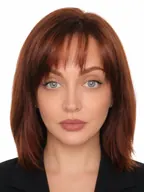
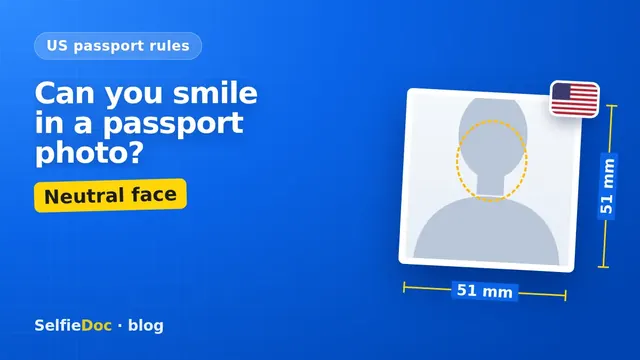
It's safer not to. For a US passport photo, the safest expression is neutral, with both eyes open and your mouth closed. A summary of the current travel.state.gov page describes it that way, but a handout we found allowed a natural smile, and we could not confirm which wording applies today. Check the official page. The photo itself is 2×2 in (51×51 mm), in color, on a plain white or off-white background, and taken within the last 6 months. You can make one online from a good selfie in SelfieDoc.
What the State Department says about smiling
A summary of the current travel.state.gov photo page describes a neutral facial expression with both eyes open and mouth closed. You also need to face the camera directly, with your full face in view. We could not retrieve the exact wording of the page.
We could not confirm whether the current page says "natural smile". One handout we found did. Check the official page before you shoot. Many websites still say a natural smile is fine. That idea comes from a handout we cannot date, explained below.
| Parameter | Requirement | Source |
|---|---|---|
| Facial expression | Neutral, both eyes open, mouth closed (from a summary of the page; exact wording not confirmed) | travel.state.gov, passport photo requirements |
| Face position | Face the camera directly, full face in view | travel.state.gov, passport photo requirements |
| Photo size | 2×2 in (51×51 mm) | travel.state.gov, passport photos |
| Head height | 1 to 1 3/8 in (25–35 mm), chin to top of head | travel.state.gov, passport photos |
| Background | Plain white or off-white, no shadows, textures or objects | travel.state.gov, passport photos |
| Color and age | 1 color photo taken within the last 6 months | travel.state.gov, passport photos |
| Glasses | Remove all glasses, including sunglasses and tinted lenses; a signed doctor's note is needed if you can't remove them for medical reasons | travel.state.gov, passport photos |
| Online renewal file | JPG, JPEG, PNG, HEIC or HEIF; 54 KB to 10 MB | travel.state.gov, uploading a digital photo |
Checked: October 2026, travel.state.gov (wording from a summary, not a direct quote). Confirm the exact text on the official page before you apply.
Why some guides say a natural smile is OK
An older Special Issuance Agency handout allowed a natural smile. Its date is unknown. It may or may not be current. The handout still circulates online and says you must have "a neutral facial expression or a natural smile, with both eyes open". That file is hosted on a third-party site.
A summary of the current travel.state.gov page describes a neutral expression with the mouth closed. We could not confirm which wording applies today, so check the official page before you shoot. A relaxed, neutral face fits both descriptions.
Even that wording said "natural smile", which is not the same as a wide grin.
What a neutral expression looks like in practice
A neutral expression is your relaxed, everyday face. We could not find a detailed official checklist, so the tips below are practical advice built on the summarized description.
- Keep your lips together and your jaw relaxed.
- Keep both eyes fully open and look straight into the lens.
- Don't raise your eyebrows or frown.
- Relax your shoulders and take a breath before the shot.
- Take several frames and pick the one where you look calm and natural.
A neutral face does not have to look stiff. Many people find it easier to think of something mildly pleasant without moving their mouth. The result is a calm look that still fits a "mouth closed" description.
Common expression mistakes in passport photos
Most problems with expression come from the moment of the shot. People do not usually misread the rules.
- A smile with teeth. It does not match the mouth-closed description in the summary of the current page. Retake it with your lips together.
- Half-closed eyes. Both eyes must be open. Blinks and squints often happen under bright light, so take a few frames.
- Head tilted or turned. You need to face the camera directly with your full face in view.
- Glasses left on. Remove them unless you have a signed doctor's note for medical reasons.
- Edited expression. Filters and retouching are not allowed. Editing that changes the outline of your head, face or neck makes the photo unacceptable. If you don't like your expression, retake the photo instead of editing it.
How to take the photo with the right expression
You can get a US passport photo at a photo counter or make one yourself from a selfie. We could not confirm the State Department's wording on self-taken photos, so check the official page. Either way, expression is about the shot, not the processing.
At home. Ask someone to take the photo with the camera at eye level. Stand in front of a plain white or off-white wall in even light, so there are no shadows on your face or behind you. Our guide on taking a passport photograph with your phone covers light and camera position in more detail.
At a photo counter. Photo shops and some drugstores offer passport photos. Check the price on the shop's own site. Before you leave, check that your mouth is closed and your eyes are fully open.
Online from a selfie. SelfieDoc crops the photo to the US passport template, evens out the background and sets the size and head position. It does not change your facial features or your expression. So a smile in the selfie stays in the photo. Take the selfie with a neutral face and your mouth closed.
If you are renewing online, the digital file must be JPG, JPEG, PNG, HEIC or HEIF and between 54 KB and 10 MB. For a paper application, you need 1 printed color photo at 2×2 in.
Does the same rule apply to US visa photos?
Visa photos are covered on a separate travel.state.gov page, and we could not confirm its wording on expression for this article. If you are applying for a US visa, check the visa photo page directly. Our guide to US visa photo requirements for the DS-160 covers the visa side.
Sources
FAQ
Can you smile in a US passport photo?
Keep it neutral. A summary of the current travel.state.gov page describes a neutral facial expression with both eyes open and mouth closed, but older handouts allowed a natural smile. Check the official page. A relaxed face with your lips together is the safer choice.
Can you show teeth in a passport photo?
A summary of the current State Department page describes a closed mouth. We could not confirm the exact wording, so check the official page. Keeping your lips together is the safer choice.
Is a slight smile a problem in a passport photo?
We could not confirm how the current rule treats a slight smile. A summary of the current page describes a neutral expression with the mouth closed, while older handouts allowed a natural smile. Check the official page. If you are unsure about your photo, retake it with a relaxed, neutral face.
Is the expression rule the same for a US visa photo?
Visa photos have their own requirements page on travel.state.gov. Check that page before you apply, and see our guide to DS-160 photo rules.
Can I take a US passport photo online?
Yes, you can make the photo yourself from a good selfie. SelfieDoc crops it to the 2×2 in template, adjusts the background and gives you a file and a print layout. It does not change your facial features or your expression, so take the selfie with a neutral face and your mouth closed.
Comments
Only registered users can comment
Sign in to commentSign in with the same account you use for SelfieDoc.
No comments yet. Be the first to ask a question, and we’ll answer.