



ICAO standard photo: what it means for a UK passport
What the term means, and the UK rules that decide whether your passport photo works: size, background, pose, glasses, paper and how recent it is.
Contents
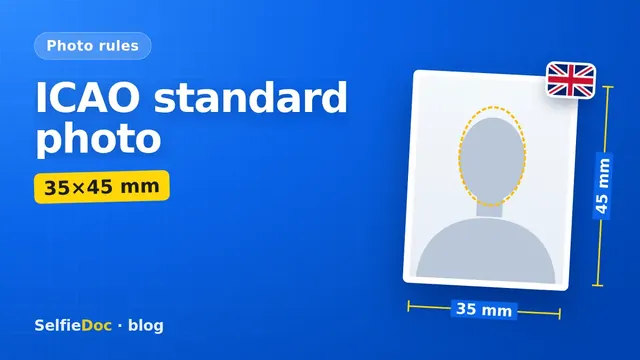
An "ICAO standard photo" is a passport photo that follows the international ICAO framework; for a UK passport, what counts is meeting the GOV.UK rules. A printed photo measures 45 mm high by 35 mm wide, with a plain cream or light grey background. You face forward with a neutral expression, and the photo must have been taken within the last month. A paper application needs two identical copies, while a digital photo needs at least 600×750 pixels. You can make this kind of photo online from a good-quality selfie in SelfieDoc.
What "ICAO standard" means for a UK photo
The term refers to the international framework for passport photos. The rules you actually follow are set by your own country. ICAO is the International Civil Aviation Organization. It coordinates standards for machine-readable travel documents. Each country then publishes its own photo requirements, and the details differ from place to place.
For a British passport, the source that counts is GOV.UK and HM Passport Office. A photo studio label saying "ICAO compliant" tells you less than the GOV.UK checklist does. The table below lists what GOV.UK sets out for UK passport photos.
| Parameter | Requirement | Source |
|---|---|---|
| Printed photo size | 45 mm high × 35 mm wide | GOV.UK: photo requirements |
| Face size (printed) | Face 29–34 mm high | GOV.UK: photo requirements |
| Background (printed) | Plain cream or light grey | GOV.UK: photo requirements |
| Background (digital) | Plain and light, clearly contrasting with the face. No objects or other people | GOV.UK: photos for passports |
| Digital file | At least 600 px wide and 750 px high. File size 50 KB to 10 MB | GOV.UK: photos for passports |
| Pixels at 300 dpi | About 413×531 px. This is a print calculation, not a GOV.UK rule | Calculated from GOV.UK size |
| Pose and expression | Facing forward and looking at the camera. Neutral expression with mouth closed. Eyes open and visible. No hair across the eyes. No red eye. No shadows on the face or behind you | GOV.UK: photos for passports |
| Glasses | Only if medically necessary. No sunglasses or tinted lenses. Frames, glare and reflections must not cover the eyes | GOV.UK: photo requirements |
| Head covering | Only for religious or medical reasons. Face must be fully visible | GOV.UK: photos for passports |
| Printed copies | 2 identical photos | GOV.UK: photo requirements |
| Paper and print | Colour, on plain white photo paper. No border, no creases or tears. Professionally printed | GOV.UK: photo requirements |
| How recent | Taken within the last month. New photo for every application | GOV.UK: take your photo |
Checked: 7 October 2026 against GOV.UK.
The paper and the background are two different things. The photo paper itself is plain white. The background behind you in the picture is cream or light grey. For the full UK checklist, see our guide to UK passport photo requirements.
Digital or printed: which version do you need?
It depends on how you apply. An online application uses a digital photo. A paper application needs printed photos. GOV.UK treats the two separately, and the rules for each are not the same.
A digital photo is measured in pixels and file size: at least 600×750 pixels and between 50 KB and 10 MB. Its background only has to be plain and light, with clear contrast against your face. A printed photo is measured in millimetres, needs a cream or light grey background and has rules about paper.
If your upload keeps being flagged, our article on digital passport photos in the UK covers the usual causes.
Photo quality and editing
GOV.UK asks for a clear, in-focus colour photo that has not been edited in software. In practice, that means no beauty filters, no smoothing and no changes to your face. Take the photo in good, even light so that you don't need to fix it afterwards.
Common mistakes with UK passport photos
Most problems come from small details, not from the size. These come up most often:
- An old photo. GOV.UK wants a photo taken within the last month. Reusing your previous passport photo does not meet this rule.
- The wrong background on a print. A printed photo needs plain cream or light grey. Any other light colour is not what GOV.UK describes.
- Shadows. A shadow on one side of the face or behind your head breaks the rule on shadows. Face a window or a soft light source.
- A face that is too small or too large. On a printed photo the face should be 29–34 mm high. Standing too far from the camera is the usual cause.
- Glasses you don't strictly need. Glasses are allowed only for medical reasons. Even then, glare on the lenses or a thick frame across the eyes causes problems.
- A smile or open mouth. The expression has to be neutral with the mouth closed. For how another country handles this, see can you smile in a passport photo (US rules).
- Hair over the eyes. Pin back a fringe that touches the eyes.
- Home printing on ordinary paper. Printed photos need plain white photo paper and a professional print, with no border and no creases.
- Two slightly different printed photos. The two copies must be identical. That means one shot printed twice.
How to get an ICAO standard photo in the UK
There are three realistic ways, and each one suits a different situation.
Photo booth or shop. UK photo booths use the 35×45 mm size as standard. GOV.UK says you can also get a digital photo from a photo booth or shop before you start an online application. Prices vary between providers.
At home with a phone. GOV.UK says you can take your own photo, but photos from a booth or shop are approved more often. If the photo does not meet the rules, your application is delayed. Ask someone to take the photo from about arm's length or a little further, at eye level. Stand in front of a plain, light wall, facing a window, with your shoulders square to the camera. The details are on the GOV.UK take your photo page. If you are also dealing with US paperwork, our guide can I take my own passport photo covers the American rules.
Online from a selfie. SelfieDoc takes a well-lit selfie and crops it to 35×45 mm. It evens out the background and positions your head to the UK requirements. It does not change your facial features. You then check the result against GOV.UK and use it for your application or for printing. SelfieDoc is for adults aged 18 and over.
Sources
FAQ
What is an ICAO standard photo?
It is a passport-style photo that follows the shared international framework for machine-readable travel documents. Each country publishes its own exact rules. For a UK passport, the rules on GOV.UK are the ones that count. A printed UK passport photo measures 45 mm high by 35 mm wide.
Is a UK passport photo the same as an ICAO standard photo?
For a UK applicant, the practical answer is to follow GOV.UK. The UK rules cover the 35×45 mm size, a face 29–34 mm high on a printed photo, a neutral expression with the mouth closed, eyes open and visible, glasses only when medically necessary, and two identical printed copies for a paper application.
What background does an ICAO standard photo need in the UK?
A printed photo needs a plain cream or light grey background. A digital photo needs a plain light background that contrasts clearly with your face, with no objects or other people behind you. There should be no shadows on your face or behind you.
How recent does the photo have to be?
GOV.UK says the photo must have been taken within the last month. You need a new photo for every application, even if you look the same as before.
Can I take an ICAO standard photo online?
Yes. You can make a photo online from a good-quality selfie. SelfieDoc crops it to the UK passport size, evens out the background and positions your head to the requirements. It does not change your facial features. No service can promise that HM Passport Office will accept a photo, so check the result against GOV.UK before you submit it.
How many pixels does a UK digital passport photo need?
GOV.UK asks for a digital photo at least 600 pixels wide and 750 pixels high, with a file size between 50 KB and 10 MB. Separately, a 35×45 mm print at 300 dpi works out at about 413×531 pixels, but that is a print calculation, not an upload rule.
Comments
Only registered users can comment
Sign in to commentSign in with the same account you use for SelfieDoc.
No comments yet. Be the first to ask a question, and we’ll answer.