



UK visa photo size and requirements for Indian applicants
The size, background, file limits and face rules from GOV.UK, plus where the photo fits into an application from India.
Contents
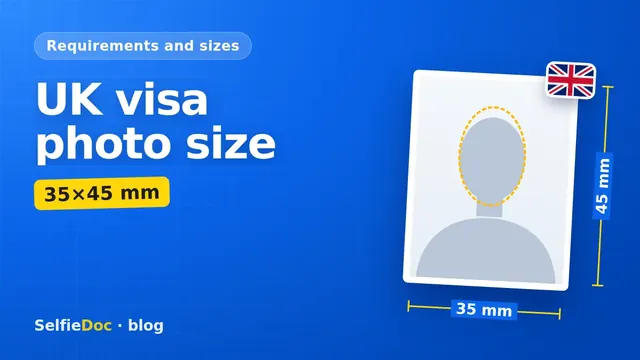
The UK visa photo size is 35×45 mm, set by GOV.UK guidance for visa and permission applications. The background must be plain and light-coloured, with no shadows on your face or behind you. A digital file must be between 50 KB and 6144 KB, in colour and not altered by filters. You can prepare this photo online from a good-quality selfie in SelfieDoc.
UK visa photograph requirements
GOV.UK lists size, background, lighting, glasses and image quality rules for every UK visa photo. The table below covers each one.
| Parameter | Requirement | Source |
|---|---|---|
| Size | 35×45 mm | GOV.UK visa photo guidance |
| Pixels (print calculation) | About 413×531 px at 300 dpi. A conversion for printing, not a Home Office rule | Calculated from 35×45 mm |
| Background | Plain, light-coloured. No exact shade is specified | GOV.UK visa photo guidance |
| File size | 50 KB to 6144 KB | GOV.UK visa photo guidance |
| Expression | Neutral, mouth closed, no smile (general GOV.UK photo rules) | GOV.UK visa photo guidance |
| Glasses | Not allowed unless medically needed. If needed: no tinted lenses, eyes not covered by frame, glare, reflection or shadow | GOV.UK visa photo guidance |
| Shadows and light | No shadows on the face or behind you. Balanced lighting | GOV.UK visa photo guidance |
| Quality | Clear, in focus, in colour, well lit. Not altered by software or filters, not mirrored or flipped, vertical | GOV.UK visa photo guidance |
Checked: July 2026 against GOV.UK visa photo guidance.
The expression rule comes from the general GOV.UK photo rules for passports. The visa page does not state it separately. Keeping a neutral face with your mouth closed is the safe choice for both.
How the photo fits into an application from India
The application steps depend on your visa route. Your online application on GOV.UK shows whether you need an appointment at a visa application centre in India and which centres you can choose.
The photo step also depends on your route. Some applications ask you to upload a digital photo in the online form. In others, your photo is taken at the appointment. Our sources do not confirm which routes accept a photo you took yourself. Check two things before you prepare anything:
- Read the photo step in your online application on GOV.UK.
- Check the website of the visa application centre listed for your city.
If the form asks for an upload, use a file between 50 KB and 6144 KB. Exact pixel dimensions for online upload are not given in our sources. Follow the limits the form itself shows. If they differ from this article, the form wins.
How many photos do you need?
The number of printed photos for a UK visa from India is not stated in our sources. Check the checklist on GOV.UK for your route and the visa application centre website before you print.
Size in cm, inches and pixels
35×45 mm is 3.5×4.5 cm, or about 1.38×1.77 inches. If you print it yourself, set the photo to 35×45 mm, or about 413×531 px at 300 dpi. For a printable layout on photo paper, see our guide to 8 passport size photos on 4x6 paper.
Common mistakes with a UK visa photo
Most problems come from the phone camera, the room light or the wrong frame:
- Mirrored selfie. Many front cameras save a flipped image. GOV.UK asks for a photo that is not mirrored or flipped. Turn off mirroring in camera settings or flip the image back.
- Beauty mode or filters. Skin smoothing, face slimming and colour filters count as alteration. Switch them off before you take the photo.
- Shadow on the wall. A single lamp or the sun from one side throws a shadow behind your head. Stand facing a window and step away from the wall.
- Busy background. A cupboard, curtain pattern or door frame in the shot is not a plain background. Use a light, empty wall.
- Glasses on by habit. Take them off unless you need them for medical reasons.
- Smiling or open mouth. Keep a neutral face with your mouth closed.
- Wrong frame. A 2×2 inch photo for a US visa is a different size. A UK visa photo is 35×45 mm. If you are applying to several countries, see our guides to the Schengen visa photo size and the Canada visa photo size.
- File too small. Heavy compression in WhatsApp or a resizing app can push a file below 50 KB. Send the original file to yourself as a document, not as an image.
Photo required for a UK visa: three ways to get it
You can take it at home, get it done at a photo studio, or prepare it online from a selfie. Any of the three works if the result meets the GOV.UK rules above.
At home with a phone
- Stand about half a metre from a plain, light-coloured wall.
- Face a window in daylight so light falls evenly on your face.
- Ask someone to hold the phone at eye level with the rear camera. Self-timer on a stand also works.
- Look straight at the camera with a neutral face and your mouth closed.
- Check the photo for shadows, blur and filters before you crop it to 35×45 mm.
For more tips on shooting at home, see can I take my own passport photo. That guide is written for US passports, but the advice on light and posture applies here too.
At a photo studio
Many photo studios in India print passport-size photos. Ask for 35×45 mm with a plain light-coloured background, and say it is for a UK visa. Ask for no software filters or retouching, as GOV.UK requires an unaltered photo. If you also need a digital file, ask for the original, not a WhatsApp copy. Studio prices vary.
Online from a selfie
SelfieDoc takes a clear selfie and crops it to 35×45 mm, evens out the light-coloured background and sets the head position to the visa template. It does not change your facial features. Check the photo step of your application first, so you know whether you need a file to upload or a print.
Sources
FAQ
What is the UK visa photo size?
GOV.UK sets the UK visa photo size at 35×45 mm. If you print it at 300 dpi, that works out to about 413×531 pixels. This is a print calculation, not a separate pixel rule from the Home Office.
What background is required for a UK visa photo?
The background must be plain and light-coloured. GOV.UK does not name one exact shade. There should be no shadows behind you and no patterns or objects.
What file size is allowed for a digital UK visa photo?
GOV.UK guidance gives a file size between 50 KB and 6144 KB. Exact pixel dimensions for online upload are not set out in our sources, so follow what your application form shows.
Can I wear glasses in a UK visa photo?
Only if you need them for medical reasons. In that case the lenses must not be tinted, and the frame, glare, reflection or shadow must not cover your eyes.
Can I take a UK visa photo online?
It depends on your route. If your form asks for an upload, you can prepare the file from a selfie in SelfieDoc. It crops to 35×45 mm, evens out the background and adjusts size, without changing your facial features. On some routes the photo is taken at the appointment instead, so check your application first.
Comments
Only registered users can comment
Sign in to commentSign in with the same account you use for SelfieDoc.
No comments yet. Be the first to ask a question, and we’ll answer.