



Saudi visa photo requirements for Indian applicants
The exact pixel size, file size, background and head position the Saudi eVisa portal asks for, plus what to check if you apply for an Umrah visa through an agent.
Contents
- Saudi eVisa photo requirements at a glance
- Applying from India: eVisa, Umrah visa and printed photos
- Umrah visa photo: what we know and what we don't
- Can you wear a head covering in a Saudi visa photo?
- Common mistakes with Saudi visa photos
- How to take a Saudi visa photo
- Where else do Indian travellers need visa photos?
- Sources
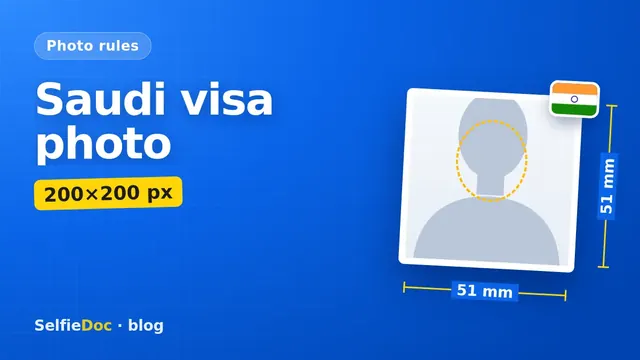
For a Saudi eVisa you upload one digital photo of 200×200 pixels, between 5 KB and 100 KB. The background must be plain white, and your face should fill 70–80% of the frame from chin to crown. The photo should be no older than six months and goes straight into the online application on the Saudi eVisa portal. You can prepare this file online from a good-quality selfie in SelfieDoc.
Saudi eVisa photo requirements at a glance
All the numbers below come from one official page: the photo specifications on the Saudi eVisa portal.
| Parameter | Requirement | Source |
|---|---|---|
| Dimensions | 200 × 200 pixels (width and height) | Saudi eVisa photo specifications |
| File size | 5–100 KB | Saudi eVisa photo specifications |
| Background | White, plain, no pattern. No other people or objects. No shadows on the background | Saudi eVisa photo specifications |
| Head and face | Facing the camera straight on, no turning or tilting. Both ears and both cheeks visible. Face from chin to crown fills 70–80% of the photo (the page also states 1.4" × 1.6" from chin to crown) | Saudi eVisa photo specifications |
| Head covering | Generally not allowed. Religious exception possible if the face is visible from the bottom of the chin to the forehead, with no shadows | Saudi eVisa photo specifications |
| Recency | Not older than 6 months | Saudi eVisa photo specifications |
| Submission | Uploaded online in the eVisa application | Saudi eVisa photo specifications |
Checked: November 2026 against the Saudi eVisa photo specifications page.
Applying from India: eVisa, Umrah visa and printed photos
If you apply for the Saudi eVisa yourself, the photo is a digital upload only. You do not need prints for the online form. The 200×200 px and 5–100 KB limits are upload settings, so they tell you nothing about the size of a printed photo.
Many Indian travellers do not use the eVisa portal directly. They apply through a travel agent, especially for Umrah. In that case the rules above may not be the ones your file is checked against. Official confirmation that the eVisa specifications cover Umrah visas handled by agents was not available when we checked.
Before you book a studio, ask your agent or visa centre three questions:
- Do you need a digital file, printed photos, or both?
- If prints are needed, what size and how many?
- Is there a rule on glasses or head coverings beyond the eVisa page?
Write down their answer, and check the current details on the website of the visa centre or agent you are using. We have not listed a centre name or a print size here because no official source confirmed them for India.
Umrah visa photo: what we know and what we don't
The only published photo rules are those of the Saudi eVisa portal. If you apply for your Umrah trip through the eVisa portal, follow the table above.
If an Umrah operator files your visa, their photo format is what counts. Some operators and photo shops quote fixed print sizes and photo counts for Umrah. Those numbers do not appear on the official pages we checked, so treat them as the agent's own rule and confirm it directly.
Can you wear a head covering in a Saudi visa photo?
Only for religious reasons. Your full face must stay visible from the bottom of the chin to the forehead, and no shadows can fall on it. Other head coverings fall under the general ban, so remove them.
If you are unsure how the religious exception fits with other points in the table, check the eVisa portal or ask your agent before uploading.
Common mistakes with Saudi visa photos
Most upload problems come from the file, not the face. These are the ones to check first:
- Wrong shape. The photo must be square, 200×200 px. A 35×45 mm crop from your passport photo will not fit.
- File too heavy or too light. Over 100 KB or under 5 KB. Phone photos are often several MB, so resize and compress them.
- Off-white or patterned background. A cream wall, a curtain or a door frame in the corner breaks the "plain white" rule.
- Shadows behind the head. Standing close to the wall with a single overhead light throws a shadow on the background.
- Face too small. A selfie taken at arm's length with your shoulders and room visible leaves the face far below 70–80% of the frame.
- Tilted or turned head. Even a slight turn can hide one ear or one cheek.
- Hair covering the ears. Tuck it back so both ears show.
- Old photo. A picture from your last passport application is likely older than six months.
- Someone else in the frame. Crop out people and objects completely.
How to take a Saudi visa photo
You have three practical options: at home with a phone, at a photo studio, or online from a selfie.
At home with a phone
Stand about half a metre in front of a plain white wall, facing a window for even daylight. Ask someone to hold the phone at eye level. Our guide on taking a passport photograph with your phone covers light and framing in detail.
The official page does not say whether self-taken photos are allowed, so check the portal before uploading. Our article Can I take my own passport photo? has general home-photo tips, though it is based on US rules.
After shooting, crop the image to a square, resize it to 200×200 px and check the file is between 5 and 100 KB.
At a photo studio
Many studios can make a digital visa photo. Ask first whether they can deliver a 200×200 px file for the Saudi eVisa, not a standard passport-size print. Studio prices vary, so ask before the shoot. If your agent also wants prints, bring their size request in writing.
Online from a selfie
SelfieDoc takes a good-quality selfie and crops it to 200×200 px. It evens out the background to white and keeps the file within the size limit. It does not change your facial features. You still need a sharp selfie with even light, a straight head and both ears visible.
Where else do Indian travellers need visa photos?
Almost every visa has its own photo rules, and the sizes rarely match the Saudi square format. See our guides to the UAE visa photo size, the Schengen visa photo size for Indian applicants and the Singapore visa photo size.
Sources
FAQ
What size photo is needed for a Saudi eVisa?
The Saudi eVisa portal asks for a digital photo of 200×200 pixels with a file size between 5 KB and 100 KB. Your face should fill 70–80% of the image, from chin to the top of the head.
What are the Umrah visa photo requirements?
The published specifications are for the Saudi eVisa portal. Whether they apply to an Umrah visa arranged by a travel agent is not confirmed. Ask your agent which photo size and how many prints they need.
Can I wear a hijab or cap in a Saudi visa photo?
Head coverings are generally not allowed. A religious head covering may be accepted if your whole face is visible from the bottom of the chin to the forehead and there are no shadows on it.
Can I wear glasses in a Saudi visa photo?
The official specifications page does not mention glasses. Check the Saudi eVisa portal or ask your agent before you upload.
How old can my Saudi visa photo be?
The photo should not be older than six months.
Can I take a Saudi visa photo online?
Yes, you can prepare the digital file online. SelfieDoc takes a good-quality selfie and adjusts the crop, white background and file size to the published eVisa specifications without changing your facial features. The card does not say whether a self-made photo is accepted, so check the portal first. For an Umrah visa through an agent, confirm the format with the agent first. The decision on the visa rests with the Saudi authorities.
Comments
Only registered users can comment
Sign in to commentSign in with the same account you use for SelfieDoc.
No comments yet. Be the first to ask a question, and we’ll answer.