



UK passport photo size: 35×45 mm and where you need it
The exact UK passport photo size in millimetres, centimetres, inches and print pixels. It also covers which applications use this size and how to print it without cropping errors.
Contents
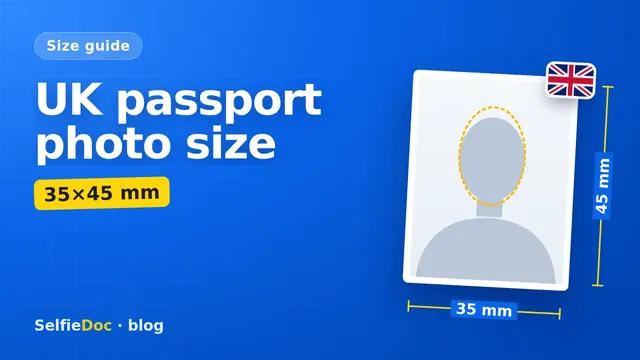
A printed UK passport photo measures 45 mm high by 35 mm wide. That is 3.5×4.5 cm, or about 1.38×1.77 inches. For printing at 300 dpi it works out at 413×531 pixels. A paper application needs 2 identical prints, and an online application uses a digital file of at least 600×750 pixels. You can make a photo in this size online from a good-quality selfie with SelfieDoc.
UK passport photo size in cm, inches and pixels
The official size is 35 mm wide by 45 mm high. GOV.UK describes it as "the standard size used in photo booths in the UK". The centimetre, inch and print-pixel values in the table are conversions of that size.
| Parameter | Requirement | Source |
|---|---|---|
| Size in mm | 35 mm wide × 45 mm high | GOV.UK photo requirements |
| Size in cm | 3.5 × 4.5 cm (conversion) | GOV.UK photo requirements |
| Size in inches | about 1.38 × 1.77 in (conversion) | GOV.UK photo requirements |
| Pixels for printing | 413 × 531 px at 300 dpi (print conversion, not an official rule) | GOV.UK photo requirements |
| Face height on the print | 29–34 mm | GOV.UK photo requirements |
| Background (print) | Plain cream or light grey | GOV.UK photo requirements |
| Background (digital) | Plain and light, with clear contrast against your face | GOV.UK: photos for passports |
| Digital file (online) | At least 600 px wide × 750 px high, 50 KB to 10 MB, in colour, clear and in focus | GOV.UK: photos for passports |
| Number of prints | 2 identical photos | GOV.UK photo requirements |
| Paper and print | Colour, plain white photo paper, no border, no creases or tears, professionally printed | GOV.UK photo requirements |
| How recent | Taken within the last month, a new photo for every application | GOV.UK: take your photo |
Checked: November 2026 against GOV.UK "Photos for passports".
Face forward and look at the camera. Keep a neutral expression with your mouth closed and your eyes open and visible. There should be no shadows on your face or behind you. Glasses are allowed only if you need them for medical reasons, and tinted lenses are not allowed. The full list is in our UK passport photo requirements guide.
Which UK applications need a 35×45 mm photo
The 35×45 mm size is for printed photos. An online application works with a digital file, so pixels and file size matter there instead of millimetres.
| Application | Is 35×45 mm needed? | What to check |
|---|---|---|
| UK passport, paper application | Yes, 2 identical prints | Cream or light grey background, white photo paper, professional print |
| UK passport, online application | No, a digital file is used | At least 600×750 px, 50 KB to 10 MB |
| Other forms asking for a "passport-sized photo" | Often, as it is the standard UK booth size | The form's own guidance, as sizes can differ |
If your online upload keeps failing, read our guide to digital passport photos in the UK.
How 35×45 mm differs from other passport sizes
The UK size is a portrait rectangle, taller than it is wide. The US photo is a different, square format, so re-crop the original image to 35×45 mm instead of trimming a US print. Our general passport photo dimensions guide covers the US format.
The UK digital photo has its own rules too. It is measured in pixels (at least 600×750 px) and needs a plain light background. Prints are measured in millimetres (35×45 mm) and need a cream or light grey one.
Common mistakes with UK passport photo dimensions
Most size problems come from conversion and printing, not from the camera.
- Printing in inches with rounding. Entering 1.4×1.8 in instead of the exact values gives a photo slightly larger than 35×45 mm.
- "Fit to page" in the print dialogue. The printer scales the image and the size changes. Always print at 100% or "actual size".
- Wrong aspect ratio. Cropping a phone photo to a square or a 3:4 frame distorts the 35:45 proportion.
- Face too small or too large. On the print, your face should be 29–34 mm high.
- Using print pixels for an online upload. 413×531 px is below the online minimum of 600×750 px.
- Borders and white margins. GOV.UK asks for prints without a border.
- An old photo. The photo must be taken within the last month, even if you look the same.
How to print 35×45 mm photos on a 6×4 inch sheet
Set the photo size to exactly 35×45 mm in your layout tool and print at 100% on a standard 6×4 inch (10×15 cm) sheet. Order the print from a photo lab on plain white photo paper, as GOV.UK asks for professional printing, then cut without leaving a white border. The sheet is only a convenient way to print, not a passport requirement; layouts are in our guide to passport photos on 4×6 paper.
Ways to get a UK passport photo
You have three practical options, and each needs its own checks.
Photo booth or shop. According to GOV.UK, 35×45 mm is the standard size used in UK photo booths. GOV.UK also notes that photos from a booth or shop are approved more often than photos taken on a personal device. In-store prices vary.
At home. Use daylight from a window, a plain light wall and a second person to hold the phone at eye level. Our guide to taking your own passport photo covers the camera setup. It is written for US rules, so take the size and background from GOV.UK.
Online from a selfie. SelfieDoc crops your selfie to 35×45 mm, evens out the background and fits your head to the frame. It does not change your facial features. You then upload the file or have it printed at a photo lab. A photo that does not meet the rules can delay an application, so compare the result with the GOV.UK checklist first.
Sources
FAQ
What is the UK passport photo size in cm?
A printed UK passport photo is 4.5 cm high and 3.5 cm wide. GOV.UK gives it as 45 mm by 35 mm, the standard size used in UK photo booths.
What is the UK passport photo size in inches?
35×45 mm converts to about 1.38 inches wide by 1.77 inches high. GOV.UK only states the size in millimetres. If your printer or app asks for inches, enter the exact values or set the size in millimetres.
What is the UK passport photo size in pixels?
For printing at 300 dpi, a 35×45 mm photo is 413×531 pixels. This is a print conversion, not an official rule. For the online application, GOV.UK asks for a digital photo of at least 600 pixels wide and 750 pixels high, with a file size between 50 KB and 10 MB.
How many printed photos do I need for a paper passport application?
GOV.UK asks for 2 identical printed photos. They must be in colour, on plain white photo paper, without a border, and professionally printed. The photo must be taken within the last month.
Can I take a UK passport photo online?
SelfieDoc can prepare a 35×45 mm photo from a good-quality selfie. It crops the image, evens out the background and fits your head to the frame. It does not change your facial features. Before you apply, check the current photo rules for your route on GOV.UK. Nobody can promise in advance that a photo will be accepted.
Is a UK passport photo the same size as a US one?
No. The UK uses a portrait 35×45 mm photo, while the US uses a different, square format. Re-crop the original image to 35×45 mm rather than trimming a US print.
Comments
Only registered users can comment
Sign in to commentSign in with the same account you use for SelfieDoc.
No comments yet. Be the first to ask a question, and we’ll answer.